
Modernizing a mission-critical legacy platform by rethinking how employees access information and complete work. I led UX for a multi-year enterprise transformation, creating a dual-screen experience and scalable design system to improve workflow clarity, consistency, and operational efficiency.
The Challenge
SCANA’s customer information system was a mission-critical platform built in the 1990s. It supported billing, service orders, outage management, and field operations—but its complexity had accumulated over time.
Hundreds of interfaces, inconsistent data structures, and code-driven workflows forced employees to memorize commands and navigate complicated screens. The system was stable, but it placed a significant cognitive burden on employees and constrained operational efficiency.
The challenge was to modernize the experience without losing sight of the complex business processes the platform needed to support.
Rethinking the User Experience
As Lead User Experience Designer, I was responsible for the information architecture, interaction design, and usability strategy for a $20M, multi-year modernization effort.
The goal wasn't simply to make the interface look more modern. It was to rethink how employees found information, understood customer context, and completed tasks throughout their workday.
That meant simplifying complex workflows, making information easier to interpret, and creating a consistent experience across a large enterprise application.
Designing a Dual-Screen Experience
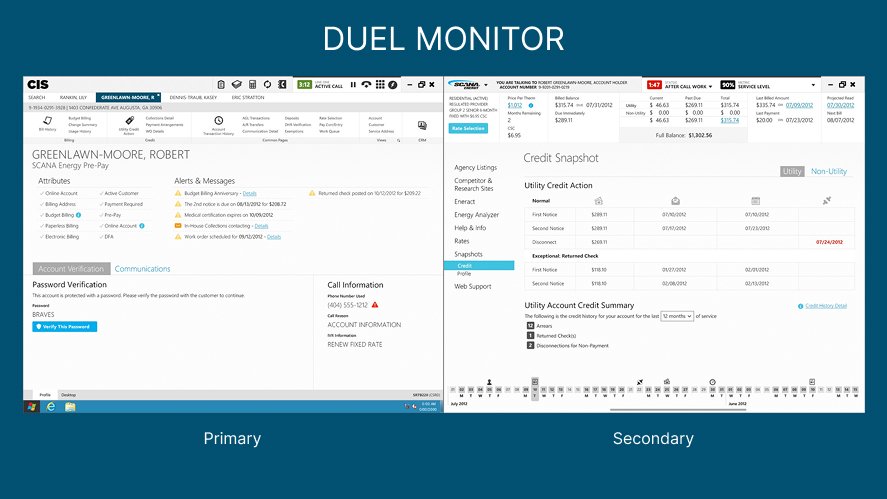
One of the most important design decisions was to separate customer context from task execution.
Instead of requiring employees to toggle between screens and mentally connect information, we designed a dual-screen model:
Customer context: One screen provided the information employees needed to understand the customer and their situation.
Task execution: The second screen focused on completing the work at hand.
This approach reduced the need to navigate back and forth between interfaces and helped employees keep relevant information in view while completing tasks.
The design was grounded in how employees actually worked—not simply in how the legacy system had been structured.
Building a Scalable Design System
The modernization involved hundreds of screens and a development team large enough that consistency couldn't depend on individual designers or developers making the same decisions independently.
I created a design system that standardized components, interaction patterns, and interface rules across the platform.
This gave dozens of developers a shared foundation for building in parallel while maintaining a consistent experience. It also helped reduce rework and supported more efficient delivery across the broader transformation.
The design system wasn't just a collection of reusable UI components. It was a way to scale UX decisions across a complex enterprise product.
Streamlining High-Volume Workflows
I redesigned critical workflows, including payments, service sign-ups, program enrollment, and outage management.
The focus was on removing unnecessary friction:
Reducing the number of steps required to complete tasks.
Eliminating redundant data entry.
Making relevant customer information available at the right moment.
Creating more consistent interactions across workflows.
These changes were intended to make frequent tasks easier to complete accurately, while reducing the time and effort required for employees to learn the system.
Enterprise-Wide Impact
The redesigned platform delivered a modern, dual-screen Windows 8-based enterprise experience for a complex utility operation.
The documented outcomes included:
A modernized platform: A clearer experience built around customer context and task execution.
Improved workflow efficiency: Streamlined interactions across critical business processes.
Faster onboarding: Reduced training demands for employees learning the system.
Greater consistency: Standardized patterns across hundreds of screens.
Scalable delivery: A shared design system that enabled dozens of developers to work in parallel.
The Impact
This project demonstrated how UX can reshape a complex enterprise system by changing the way people interact with information—not just the appearance of the interface.
By introducing a dual-screen model, simplifying high-volume workflows, and building a design system for enterprise scale, I helped translate a difficult legacy platform into a more coherent and usable experience.
The central lesson: enterprise modernization succeeds when the design addresses the complexity of the work itself. Better interfaces matter, but the larger opportunity is to reduce cognitive load, establish consistent patterns, and help people do their jobs with greater clarity and confidence.
